01 - Apparel · Sewdoo
Apparel ERP, built for the floor.
Modern, user-friendly ERP customised to meet the demands of apparel manufacturing businesses - from cutting floor to dispatch.
What Sewdoo is
Your ERP starts at the production order. A garment order is two months old by then.
Tech pack, costing, lab dips, fit samples, bulk fabric, buyer approvals - twenty-one dated, dependent steps before a single machine turns on. That is where orders are won and lost, and it is the part a general ERP cannot see.
Sewdoo is Odoo 19 with that part built in, and eight more modules that change what a garment factory would otherwise work around. The ERP underneath still does what ERPs do - stock, purchasing, manufacturing, quality, payroll, accounts.
Critical path
Every step, every dependency, and the chain that drives the ship date.
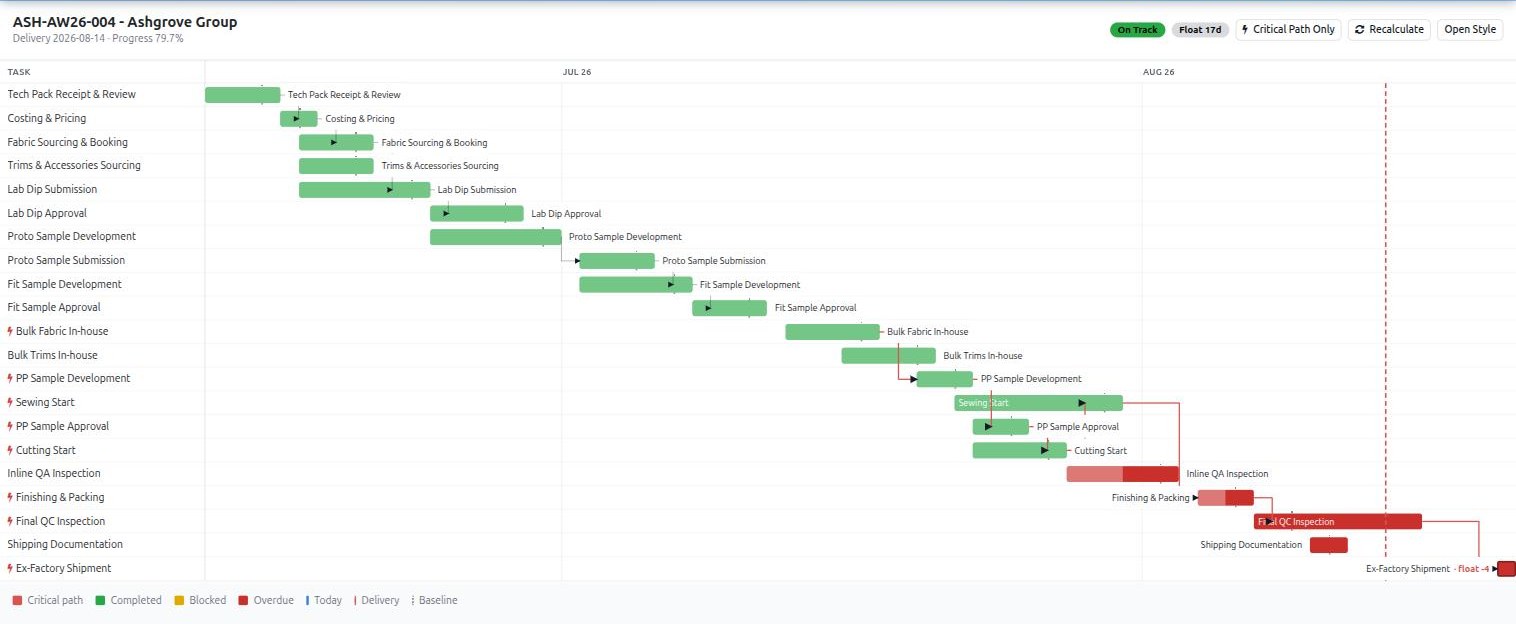
A spreadsheet stores dates. It does not know that fit approval blocks the PP sample which blocks cutting, so it cannot tell you which overdue step matters. Sewdoo runs a real critical path calculation - a forward pass, a backward pass, and float on every task.
The last bar on this style reads float -4. As planned, that container leaves four working days after the date the buyer was given. Knowing that in week six is a conversation. Finding out in week eleven is an air freight bill.
Time & Action
Nineteen of the twenty-one steps happen before a machine turns on.
This is the standard T-shirt calendar Sewdoo ships with, counted backwards in working days from the ex-factory date. It is not an illustration - it is the template that loads when you apply it to a style, dependencies and lags included. A jacket ships with its own: sixteen steps over ninety days, because lab testing and a lining change the shape of the thing. You then build your own, from your own lead times.
| Day | Dur | Stage | Step | What happens |
|---|---|---|---|---|
| -60 | 2d | Development | Tech Pack Receipt & Review | Specifications, measurements and construction checked against what the floor can actually do |
| -58 | 2d | Development | Costing & Pricing | Fabric, trims, labour and overhead. Price submitted to the buyer |
| -55 | 3d | Material | Fabric Sourcing & Booking | Approved suppliers, sampling and bulk quantity booked |
| -55 | 3d | Material | Trims & Accessories Sourcing | Labels, tags, buttons, threads, packaging |
| -52 | 5d | Material | Lab Dip Submission | Colour submitted for approval |
| -47 | 3d | Approvals | Lab Dip Approval | Buyer approves the colour, or does not |
| -45 | 5d | Sampling | Proto Sample Development | Construction and fit reviewed for the first time |
| -40 | 2d | Sampling | Proto Sample Submission | Submitted with the measurement sheet |
| -38 | 4d | Sampling | Fit Sample Development | Proto comments incorporated |
| -34 | 3d | Approvals | Fit Sample Approval | Fit approved to proceed to bulk |
| -28 | 5d | Material | Bulk Fabric In-house | All bulk fabric received and inspected |
| -25 | 3d | Material | Bulk Trims In-house | Trims received, quantity and quality verified |
| -23 | 3d | Sampling | PP Sample Development | Pre-production sample in bulk fabric and bulk trims |
| -20 | 2d | Approvals | PP Sample Approval | Approved. Production can begin |
| -18 | 3d | Production | Cutting Start | Marker efficiency target 85%+ |
| -15 | 7d | Production | Sewing Start | Lines start |
| -12 | 5d | Quality | Inline QA Inspection | AQL 2.5 major, 4.0 minor |
| -8 | 3d | Production | Finishing & Packing | Ironing, folding, tagging, poly-bagging, cartons |
| -5 | 2d | Quality | Final QC Inspection | QA team or third-party inspector, AQL sampling |
| -3 | 2d | Shipping | Shipping Documentation | Packing list, invoice, B/L, C/O |
| 0 | 1d | Shipping | Ex-Factory Shipment | Container loaded or cargo handed to the forwarder. A pinned milestone |
The cockpit
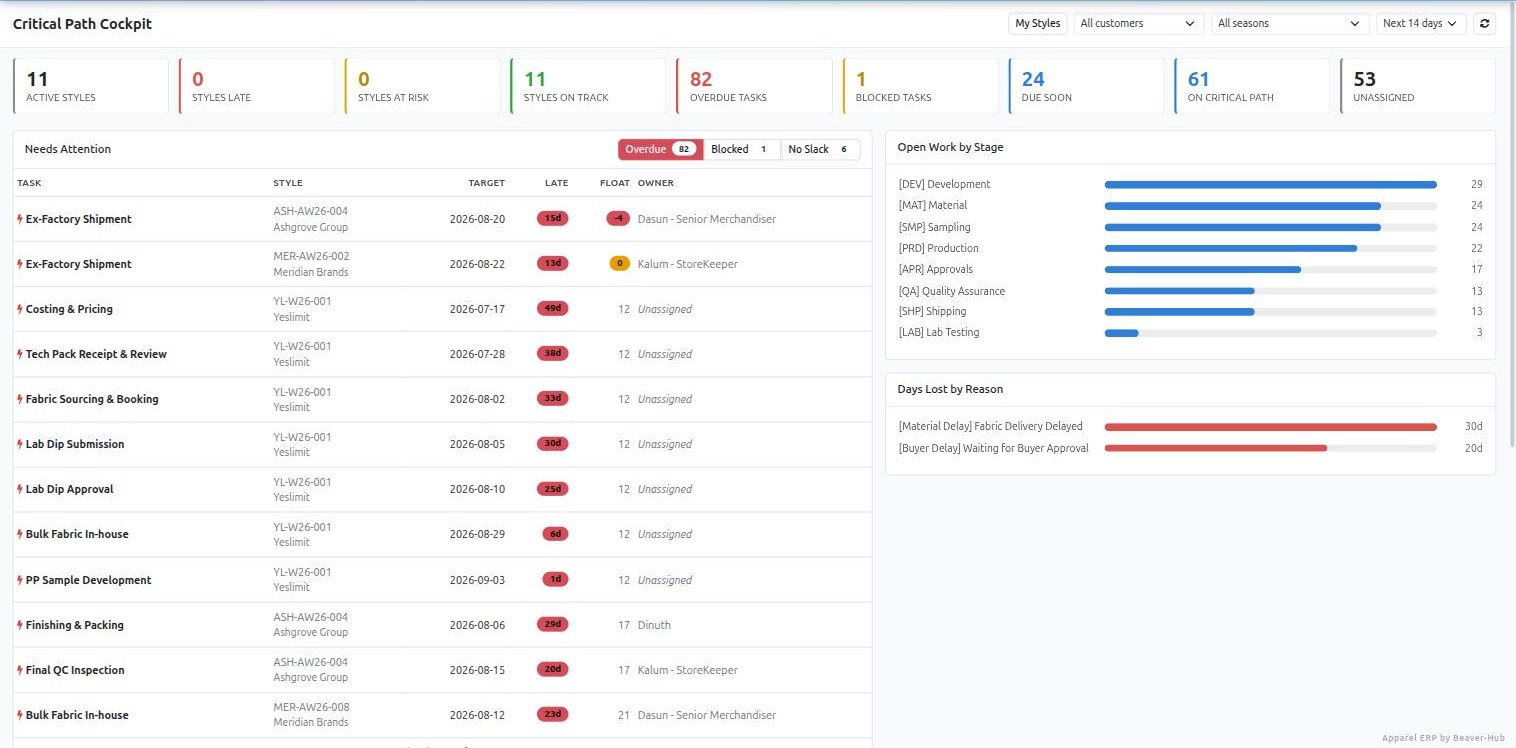
Two hundred open steps. Which one do you deal with first?
Sewdoo answers with an exception list, not a task list - and it is ranked by float first and delivery date second. A step with no slack on a style shipping next week outranks one thirty days overdue on a style shipping in March. Sort by date alone and the dangerous one is on page two.
Beside it: open work by stage, and days lost by reason - a real number, because every delayed step is tagged with one.
Nobody has to remember to look. The path recalculates hourly, status rolls up every four hours, and anything blocked for three days raises an activity on the owner and the merchandiser - an activity rather than an email, because it has a due date and survives being ignored.
Total float
Days a step can slip before the delivery slips. Zero means it is on the critical path.
Free float
Days it can slip before the next step slips. The difference between annoying and expensive.
Four link types
Finish-to-start, start-to-start, finish-to-finish and start-to-finish, each with a lag.
Working calendars
Weekends and factory holidays skipped. Five days over New Year is not five days.
Pinned milestones
Ex-factory is committed to a buyer. It does not drift to make the plan look better.
Cycle detection
A circular dependency raises an error instead of a schedule that cannot happen.
Wastage
Fabric is your biggest controllable cost. Odoo has no idea it exists.
Stock Odoo consumes what the bill of materials says. It has no concept of the metre you always lose to the marker, the end of the roll, the shade change. So the allowance lives in someone's head, and the variance shows up in the month-end costing.
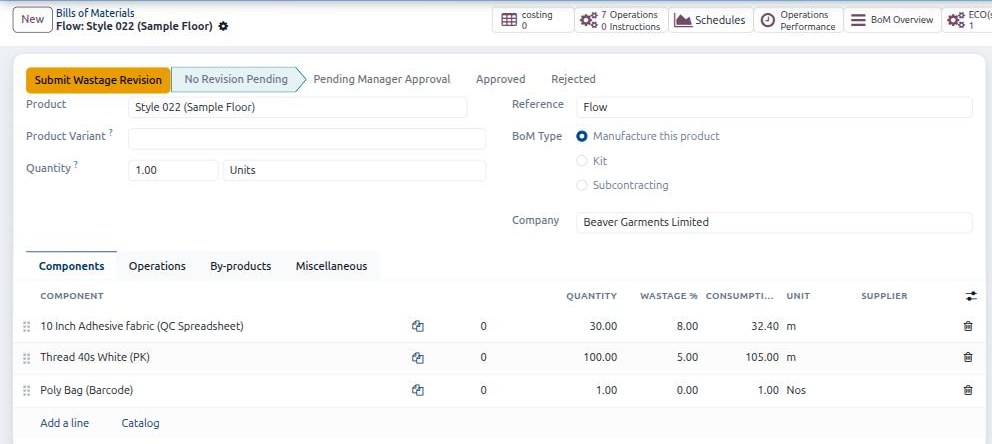
Sewdoo puts a ceiling on the product category, a real figure on the product, and a percentage on each component line - then recalculates what to consume as quantity times one plus the wastage percentage. Thirty metres at eight per cent becomes 32.40 metres, live, as you type it.
Pick a product on a line and the allowance fills in from that product's maximum, so the standard is inherited rather than remembered. Manufacturing orders inherit it and scale with batch size. A purchase order line over the ceiling can be blocked from confirming.
And going above the limit is not an edit. It is a request - submit a wastage revision, a manager approves or rejects it, and rejection reverts to the product default. The number is on the record, and so is who allowed it.
Costing
Garment costing lives in spreadsheets. So we moved the spreadsheet inside.
Nobody is giving up their costing sheet, and they should not have to - it holds years of how this factory actually prices. The problem is never the spreadsheet. It is that the file is emailed, so it goes stale, gets forked, and the number you quoted cannot be traced back.
Sewdoo's Costing app is a full collaborative spreadsheet attached to the record. Open a style, click Costing, and you get its sheet - created and named from the style the first time. Import the XLSX you already use and the format carries over. Comment on a cell and the thread stays on the cell.

It fills itself from Odoo
Any list, pivot or graph in the system pushes straight into the sheet as a live data source. Fabric prices, BoM consumption after wastage, labour minutes, on-time performance - inserted once and refreshed from the database, not retyped each season.
It locks when it is agreed
A sheet runs draft until an approver approves it, and an approved sheet is read-only. Editing it does not overwrite it - it branches version 2, keeping every link back to the style. The number you quoted the buyer stays as it was quoted.
Any model can have sheets
An administrator enables a model from a settings screen - pick it, name the button, done. No custom module, no Studio, no restart. Attach a sheet to a purchase order, a work centre, a buyer.
Access follows the record
One sheet can serve several records at once, and permission is inherited from what it is attached to - so a costing on a style is visible to exactly the people who can see that style.
The rest of the floor
Five smaller changes that stop five daily arguments.
None of these is a headline feature. Each one removes a recurring, avoidable cost that everyone in a garment factory recognises the moment you describe it.
The same fabric under three references
Because whoever created the product invented the code.
By season three the same cotton jersey exists as CJ-180, JERSEY180 and FAB-0042, and nobody can total what you actually bought. Sewdoo takes the decision away from the person at the keyboard: a category carries a prefix, the system issues the number, and variant codes derive from the base.
Once the first code is out, that prefix is locked permanently - and a deleted variant's reference is never handed to a different garment.
The lead time that decides the T&A
Shell, lining, zipper and label do not arrive together.
Stock Odoo holds the supplier on the product, so the same trim used in two styles cannot carry two sourcing plans. In apparel that is backwards - the bill of materials is a sourcing document as much as a production one.
Sewdoo puts the supplier, the lead time and the price on the component line itself. That lead time is the number your whole calendar depends on, so it belongs where the component is.
Rebuilding the size grid every season
The most repetitive hour in setting a season up.
A style is a matrix - colourways across, size run down - and creating it means adding the same attributes and the same values by hand, style after style, with a typo waiting in every one.
Define the matrix once as a template. Tick it on a new style and the whole SKU grid builds itself.
One buyer PO, four shipping dates
Sizes, colourways and destinations leave separately.
Most systems give an order one delivery date, so a phased shipment becomes either four separate orders or a spreadsheet nobody else can see.
In Sewdoo each order line carries its own delivery date, and confirming the order splits the deliveries to match - each with its own scheduled date. Change a line date later and its delivery follows.
Twelve hundred copies of four operations
And a mass edit whenever a standard time changes.
Odoo copies routing operations into every bill of materials. Three hundred styles that all run cutting, sewing, finishing and packing means twelve hundred near-identical records - and re-timing the cutting standard means touching all three hundred.
Sewdoo restores a shared master list and points every BoM at it. Change the operation once.
One database
The merchandising system and the payroll run are the same system.
Sewdoo is built on Odoo 19 Enterprise, so none of what follows is an integration, an export or a nightly sync. It is the same database as the critical path above it.
The fabric purchase order, the manufacturing order it fed, the operator's payslip for the shift that sewed it and the customer invoice at the end are the same records. There is no month-end reconciliation between two products, because there is only one.
Manufacturing
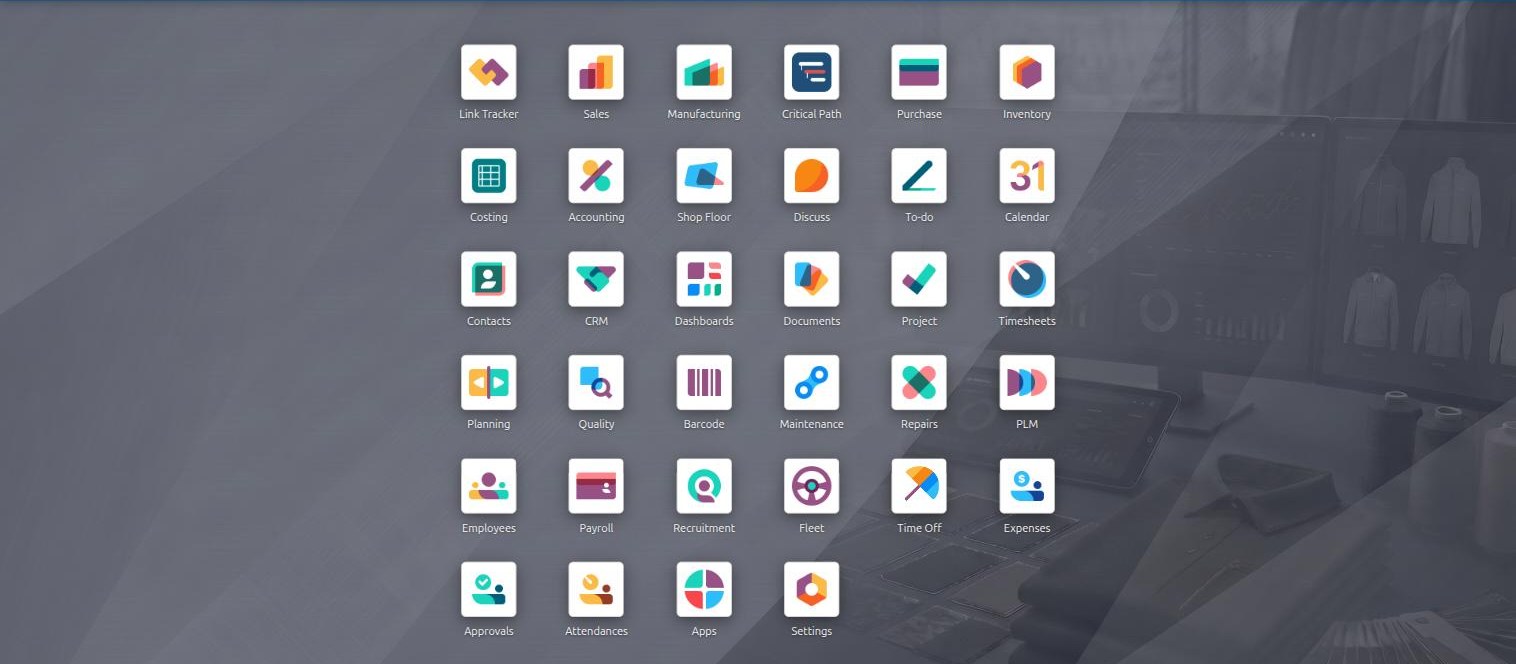
Bills of material, work orders, and work centres modelled as your actual lines and operators.
PLM
Engineering change orders against a BoM, so a mid-season construction change is versioned rather than verbal.
Quality
Control points against operations, feeding the inline and final inspection steps in the T&A.
Inventory & barcode
Fabric and trim stores, bin locations, scanning on receipt and issue.
Purchase
Sourcing against the BoM, with the component-level lead times the calendar depends on.
Accounting
Full double-entry, bank reconciliation, receivables and costing - not an export to a separate package.
HR & payroll
Attendance, leave, recruitment and payroll for the people on the lines you are scheduling.
Maintenance
Preventive schedules on machines, so a breakdown is a delay reason you can look up rather than a surprise.
Delay reasons
Twenty ways an order goes late, and none of them is "delayed".
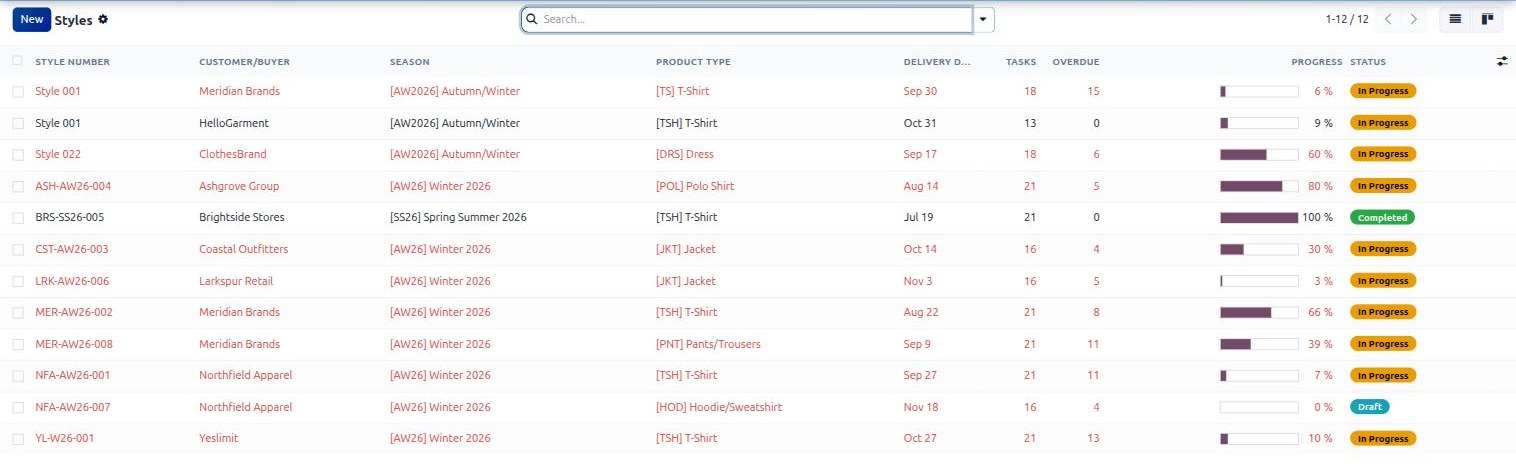
Every step that slips is tagged with a reason from a fixed list. That is what turns "we lost three weeks" into a number you can take to a mill, a buyer or a board - and it is why the cockpit can show days lost by cause rather than a total.
Set a baseline on a style and every date change after it is recorded with its variance, who moved it and when. A season review can then answer the question that actually matters: did we plan badly, or did we execute badly. That is a different question from "are we late", and most factories cannot answer it.
Material
Fabric delivery delayed · Trims delayed · Fabric quality issue · Held at customs
Buyer
Waiting for approval · Waiting for feedback · Requested change · LC or payment delay
Factory
Machine breakdown · Capacity constraint · Labour shortage · Power outage
Quality
QA inspection failed · Lab test failed · Rework required
Logistics
Vessel delay · Booking unavailable · Documentation issue
External
Holiday or factory closure · Weather or natural disaster
Where we fit
Where we lead, where we match, and where we're going next.
- A real critical path engine with float, not a colour-coded spreadsheet
- Exception lists ranked by float rather than by date
- Wastage controlled from category down to BoM line, with an approval trail
- Material codes issued and locked by the system, not typed by a user
- Merchandising, manufacturing, accounts and payroll on one database
- Delay reasons that turn lost days into a number by cause
- Bills of material, work orders and shop floor tracking
- Engineering change orders through PLM
- Quality control points and inspections
- Stock, barcode scanning and multi-warehouse
- Full accounting, payroll and HR
- Cloud hosted, no hardware to buy
- An AI merchandising layer, sharing the reasoning work already running in Mithura
- Buyer-facing visibility on style progress
- Deeper capacity planning against the sewing lines
Before you ask
Four things we can't do, and one reason we're telling you.
The reason is that you will find out anyway, and it is cheaper for both of us if you find out now. Ask every vendor on your shortlist the same question and notice which ones need a moment before answering.
- Not today
No buyer or supplier portalYour buyer cannot log in to see style progress, and your mill cannot update a shipment date directly. Everything reaches them the way it does now - by email, from a person.
- Not today
Tech packs are not imported automaticallyA tech pack arrives as a PDF or a workbook and somebody reads it. Sewdoo schedules everything that follows; it does not parse the document.
- Enterprise
The Gantt view needs Odoo EnterpriseOur own timeline view does not, and it shows dependencies, float and the baseline. But if you specifically want Odoo's native Gantt, that is an Enterprise licence.
- Planned
Line-level capacity planning is shallowWe schedule the critical path well. Balancing work across individual sewing lines is on the roadmap, and today it is planning done by your people with better information, not by an algorithm.
Everything else on this page is running. Anything we haven't answered? Call +94 76 664 6664 and ask.
Before you ask
The questions we get every time
We already have an ERP. Why would we need this?
Because your ERP almost certainly starts at the manufacturing order, and a garment order is two months old by the time it gets there. Tech pack, costing, lab dips, proto, fit and PP samples, bulk fabric, buyer approvals - twenty-one dated, dependent steps before cutting starts on a basic T-shirt. That is the part that decides whether you ship on time, and it is the part your ERP does not model. If your merchandisers run it on a spreadsheet, that spreadsheet is your real planning system.
How is this different from a T&A spreadsheet?
A spreadsheet stores dates. It does not know that the fit approval blocks the PP sample which blocks cutting, so it cannot tell you which of your overdue steps actually matters. Sewdoo runs a critical path calculation - a forward pass, a backward pass and float on every task - so it can tell you that this step has seventeen days of slack and that one has none. It also recalculates every hour on its own, chases blocked work after three days, and keeps the history of every date change. A spreadsheet does none of that.
What does "float" actually mean in practice?
Total float is how many working days a step can slip before your delivery date slips. Zero float means it is on the critical path and any delay is a delayed shipment. Negative float means the plan already does not work. On our demo data one style shows ex-factory shipment at minus four days, which means that as planned the container leaves four working days after the date the buyer was given. Knowing that in week six is a conversation. Finding out in week eleven is an air freight bill.
Do we have to use your T&A templates?
No. Two ship with the system - a twenty-one step T-shirt over sixty days and a sixteen step jacket over ninety - because a new install with an empty template library is useless. They are a starting point. You build your own from your own lead times, with your own steps, dependencies and lags, per product type. Applying one shows you a preview of every task it will create before it creates anything, and what you approve in the preview is exactly what you get.
What is the wastage module actually for?
Fabric is the largest controllable cost in cutting and stock Odoo has no concept of wastage at all. Sewdoo puts a maximum on the product category, an actual figure on the product, and a percentage on each BoM component - then recalculates what to consume as base quantity times one plus that percentage. Thirty metres at eight per cent becomes 32.40 metres. Manufacturing orders inherit it and scale with batch size, purchase orders can be blocked when a line exceeds the ceiling, and going above the limit is an approval request rather than a quiet edit.
Why generate material codes instead of letting people type them?
Because in most factories the code is invented by whoever created the product, and within two seasons you have the same fabric under three references. Sewdoo puts a prefix on the category, issues the number itself, derives variant codes from the base, and locks the prefix permanently once the first code has been issued. Codes are never reused, so a deleted variant's reference does not reappear on a different garment eighteen months later.
Is this Odoo, or is it your own product?
Both, and we would rather be plain about it. The platform is Odoo 19 Enterprise - manufacturing, PLM, quality, inventory, purchasing, accounting, payroll. On top of it we have built nine custom modules, of which the critical path engine is by far the largest. Odoo licensing is per user, direct from Odoo, and we quote it separately and openly. What you are buying from us is the apparel layer and the implementation.
How long does implementation take?
Most projects go live in six to nine months, and it depends on how many mills and outlets you have, whether you are migrating style history, and how ready your master data is. We scope it properly before quoting rather than giving you a number we would have to walk back. Ask for the timeline in writing as part of your proposal - from us and from everyone else you are talking to.
Do we own our data?
Yes. The database is yours and you can export it in full at any time. You are not locked into us as a supplier in order to keep operating, and that is deliberate. It is also worth asking every vendor on your shortlist the same question.
Product demo
See Sewdoo in action
A twelve-minute walk through the typical business flow of an apparel manufacturer inside Sewdoo - the look, the feel and the everyday user-friendliness.
Implementation
Go live in 6-9 months
Sewdoo arrives pre-configured for apparel, which is why most projects complete in months rather than years. Phase it or roll it out whole, depending on how ready you are.
Further reading